
Enable Faxing for Users
Faxing is an optional feature for an additional fee. Contact your Mobile Locker account manager to learn more about this functionality.
Faxing must be enabled at two levels before users can send:
- Team — Mobile Locker enables faxing for your team (including page quota).
- User — Each user who may send faxes needs Can send faxes set to Yes.
Users who cannot send faxes can still appear in admin fax tools if they have fax admin permissions.
See who can send faxes
- Go to the Users list.
- Scroll down and filter on Can send faxes to see Yes, No, or All.
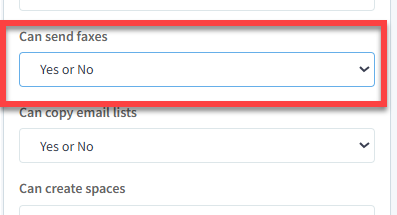
Enable a user to send faxes
- Go to the Users list.
- Find the user and click Edit.
- Scroll to Sending Faxes (or equivalent permission field).
- Set Can send faxes to Yes.
- Click Save.
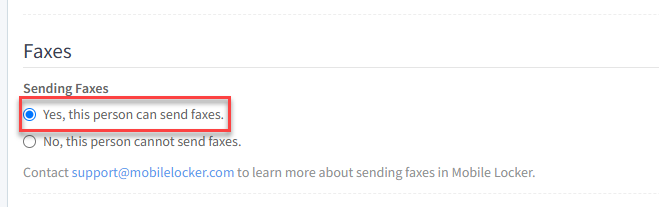
The user will see Faxes in the content library menu and can open Send a Fax.
Disable fax sending for a user
Set Can send faxes to No on the user profile. The user keeps historical fax messages but cannot send new faxes.
Fax admin access (separate permission)
Users who manage team fax settings (snippets, all contacts, team message history) need Can edit faxes (fax admin). That permission controls access to Admin → Faxes, not whether they can send.
| Permission | Effect |
|---|---|
| Can send faxes | Send faxes; manage own contacts and view own messages in the content library |
| Can edit faxes | Admin fax console: all team messages, contacts, snippets, CSV export |